Gopls: Navigation features
This page documents gopls features for navigating your source code.
Definition
The LSP textDocument/definition
request returns the location of the declaration of the symbol under the cursor.
Most editors provide a command to navigate directly to that location.
A definition query also works in these unexpected places:
- On an import path, it returns the list of locations, of each package declaration in the files of the imported package.
- On a package declaration, it returns the location of the package declaration that provides the documentation of that package.
- On a symbol in a
go:linknamedirective, it returns the location of that symbol’s declaration. - On a doc link, it returns
(like
hover) the location of the linked symbol. - On a file name in a
go:embeddirective, it returns the location of the embedded file. - On the declaration of a non-Go function (a
funcwith no body), it returns the location of the assembly implementation, if any, - On a return statement, it returns the location of the function’s result variables.
- On a goto, break, or continue statement, it returns the location of the label, the closing brace of the relevant block statement, or the start of the relevant loop, respectively.
Client support:
- VS Code: Use Go to Definition (
F12or⌘-click). If the cursor is already at the declaration, the request is instead interpreted as “Go to References”. - Emacs + eglot: use
M-x xref-find-definitions. - Vim + coc.nvim: ??
- CLI:
gopls definition file.go:#offset
References
The LSP textDocument/references
request returns the locations of all identifiers that refer to the symbol under the cursor.
The references algorithm handles various parts of syntax as follows:
- The references to a symbol report all uses of that symbol. In the case of exported symbols this may include locations in other packages.
- The references to a package declaration are all the direct imports of the package, along with all the other package declarations in the same package.
- It is an error to request the references to a built-in symbol
such as
intorappend, as they are presumed too numerous to be of interest. - The references to an interface method include references to concrete types that implement the interface. Similarly, the references to a method of a concrete type include references to corresponding interface methods.
- An embedded field
Tin a struct type such asstruct{T}is unique in Go in that it is both a reference (to a type) and a definition (of a field). Thereferencesoperation reports only the references to it as a field. To find references to the type, jump to the type declararation first.
Be aware that a references query returns information only about the
build configuration used to analyze the selected file, so if you ask
for the references to a symbol defined in foo_windows.go, the result
will never include the file bar_linux.go, even if that file refers
to a symbol of the same name; see https://go.dev/issue/65755.
Clients can request that the declaration be included among the references; most do.
Client support:
- VS Code: Use
Go to Referencesto quickly “peek” at the references, orFind all Referencesto open the references panel. - Emacs + eglot: Via
xrefpackage: useM-x xref-find-references. - Vim + coc.nvim: ??
- CLI:
gopls references file.go:#offset
Implementation
The LSP
textDocument/implementation
request queries the relation between abstract and concrete types and
their methods.
Interfaces and concrete types are matched using method sets:
- When invoked on a reference to an interface type, it returns the location of the declaration of each type that implements the interface.
- When invoked on a concrete type, it returns the locations of the matching interface types.
- When invoked on an interface method, it returns the corresponding methods of the types that satisfy the interface.
- When invoked on a concrete method, it returns the locations of the matching interface methods.
For example:
implementation(io.Reader)includes subinterfaces such asio.ReadCloser, and concrete implementations such as*os.File. It also includes other declarations equivalent toio.Reader.implementation(os.File)includes only interfaces, such asio.Readerandio.ReadCloser.
The LSP’s Implementation feature has a built-in bias towards subtypes, possibly because in languages such as Java and C++ the relationship between a type and its supertypes is explicit in the syntax, so the corresponding “Go to interfaces” operation can be achieved as sequence of two or more “Go to definition” steps: the first to visit the type declaration, and the rest to sequentially visit ancestors. (See https://github.com/microsoft/language-server-protocol/issues/2037.)
In Go, where there is no syntactic relationship between two types, a
search is required when navigating in either direction between
subtypes and supertypes. The heuristic above works well in many cases,
but it is not possible to ask for the superinterfaces of
io.ReadCloser. For more explicit navigation between subtypes and
supertypes, use the [Type Hierarchy](#Type Hierarchy) feature.
Only non-trivial interfaces are considered; no implementations are
reported for type any.
Within the same package, all matching types/methods are reported. However, across packages, only exported package-level types and their methods are reported, so local types (whether interfaces, or struct types with methods due to embedding) may be missing from the results.
Functions, func types, and dynamic function calls are matched using signatures:
- When invoked on the
functoken of a function definition, it returns the locations of the matching signature types and dynamic call expressions. - When invoked on the
functoken of a signature type, it returns the locations of the matching concrete function definitions. - When invoked on the
(token of a dynamic function call, it returns the locations of the matching concrete function definitions.
If either the target type or the candidate type are generic, the results will include the candidate type if there is any instantiation of the two types that would allow one to implement the other. (Note: the matcher doesn’t current implement full unification, so type parameters are treated like wildcards that may match arbitrary types, without regard to consistency of substitutions across the method set or even within a single method. This may lead to occasional spurious matches.)
Since a type may be both a function type and a named type with methods
(for example, http.HandlerFunc), it may participate in both kinds of
implementation queries (by method-sets and function signatures).
Queries using method-sets should be invoked on the type or method name,
and queries using signatures should be invoked on a func or ( token.
Client support:
- VS Code: Use Go to Implementations (
⌘F12). - Emacs + eglot: Use
M-x eglot-find-implementation. - Vim + coc.nvim: ??
- CLI:
gopls implementation file.go:#offset
Type Definition
The LSP
textDocument/typeDefinition
request returns the location of the type of the selected symbol.
For example, if the selection is the name buf of a local variable of
type *bytes.Buffer, a typeDefinition query will return the
location of the type bytes.Buffer.
Clients typically navigate to that location.
Type constructors such as pointer, array, slice, channel, and map are
stripped off the selected type in the search for a named type. For
example, if x is of type chan []*T, the reported type definition
will be that of T.
Similarly, if the symbol’s type is a function with one “interesting”
(named, non-error) result type, the function’s result type is used.
Gopls currently requires that a typeDefinition query be applied to a
symbol, not to an arbitrary expression; see https://go.dev/issue/67890 for
potential extensions of this functionality.
Client support:
- VS Code: Use Go to Type Definition.
- Emacs + eglot: Use
M-x eglot-find-typeDefinition. - Vim + coc.nvim: ??
- CLI: not supported
Document Symbol
The textDocument/documentSymbol LSP query reports the list of
top-level declarations in this file. Clients may use this information
to present an overview of the file, and an index for faster navigation.
Gopls responds with the
DocumentSymbol
type if the client indicates
hierarchicalDocumentSymbolSupport;
otherwise it returns a
SymbolInformation.
Client support:
- VS Code: Use the Outline view for navigation.
- Emacs + eglot: Use
M-x imenuto jump to a symbol. - Vim + coc.nvim: ??
- CLI:
gopls links file.go
Symbol
The
workspace/symbol
LSP query searches an index of all the symbols in the workspace.
The default symbol matching algorithm (fastFuzzy), inspired by the
popular fuzzy matcher FZF, attempts
a variety of inexact matches to correct for misspellings or abbreviations in your
query. For example, it considers DocSym a match for DocumentSymbol.
Settings:
- The
symbolMatchersetting controls the algorithm used for symbol matching. - The
symbolStylesetting controls how symbols are qualified in symbol responses. - The
symbolScopesetting determines the scope of the query. - The
directoryFilterssetting specifies directories to be excluded from the search.
Client support:
- VS Code: Use ⌘T to open Go to Symbol with workspace scope. (Alternatively, use Ctrl-Shift-O, and add a
@prefix to search within the file or a#prefix to search throughout the workspace.) - Emacs + eglot: Use
M-x xref-find-aproposto show symbols that match a search term. - Vim + coc.nvim: ??
- CLI:
gopls links file.go
Selection Range
The
textDocument/selectionRange
LSP query returns information about the lexical extent of each piece
of syntax enclosing the current selection.
Clients may use it to provide an operation to expand the selection
to successively larger expressions.
Client support:
- VSCode: Use
⌘⇧^→to expand the selection or⌘⇧^←to contract it again; watch this video. - Emacs + eglot: Not standard. Use
M-x eglot-expand-selectiondefined in this configuration snippet. - Vim + coc.nvim: ??
- CLI: not supported
Call Hierarchy
The LSP CallHierarchy mechanism consists of three queries that together enable clients to present a hierarchical view of a portion of the static call graph:
textDocument/prepareCallHierarchyreturns a list of items for a given position, each representing a named function or method enclosing the position;callHierarchyItem/incomingCallsreturns the set of call sites that call the selected item; andcallHierarchy/outgoingCallsreturns the set of functions called by the selected item.
Invoke the command while selecting the name in a function declaration.
Dynamic calls are not included, because it is not analytically practical to detect them. So, beware that the results may not be exhaustive, and perform a References query if necessary.
The hierarchy does not consider a nested function distinct from its enclosing named function. (Without the ability to detect dynamic calls, it would make little sense do so.)
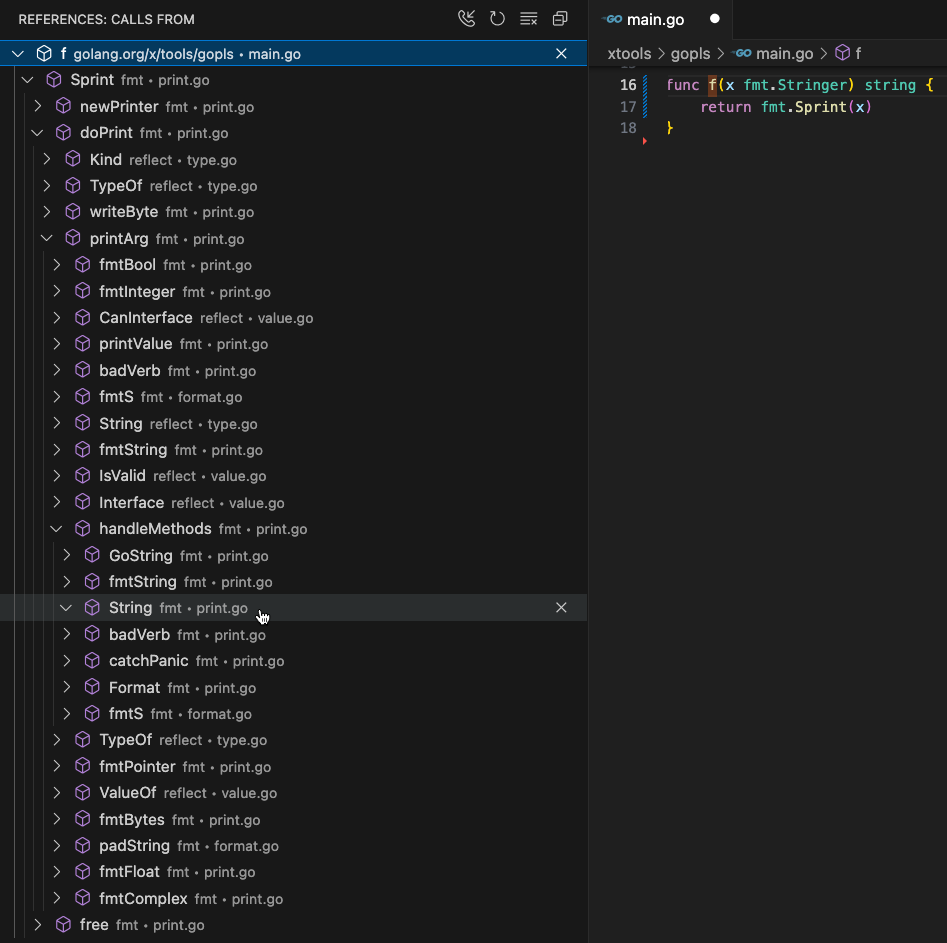
The screenshot below shows the outgoing call tree rooted at f. The
tree has been expanded to show a path from f to the String method
of fmt.Stringer through the guts of fmt.Sprint:
Client support:
- VS Code:
Show Call Hierarchymenu item (⌥⇧H) opens Call hierarchy view (note: docs refer to C++ but the idea is the same for Go). - Emacs + eglot: Not standard; install with
(package-vc-install "https://github.com/dolmens/eglot-hierarchy"). UseM-x eglot-hierarchy-call-hierarchyto show the direct incoming calls to the selected function; use a prefix argument (C-u) to show the direct outgoing calls. There is no way to expand the tree. - CLI:
gopls call_hierarchy file.go:#offsetshows outgoing and incoming calls.
Type Hierarchy
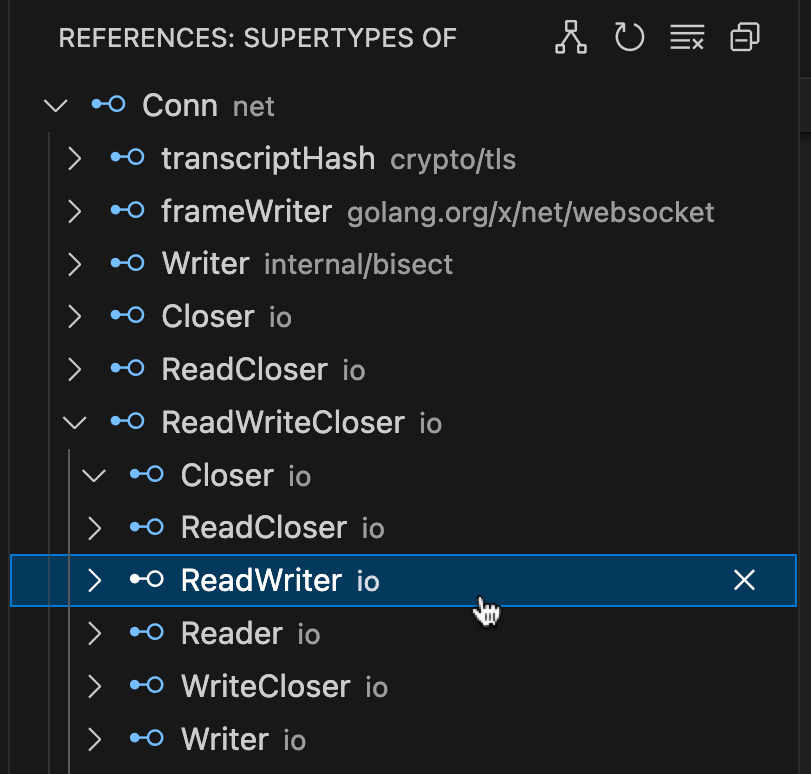
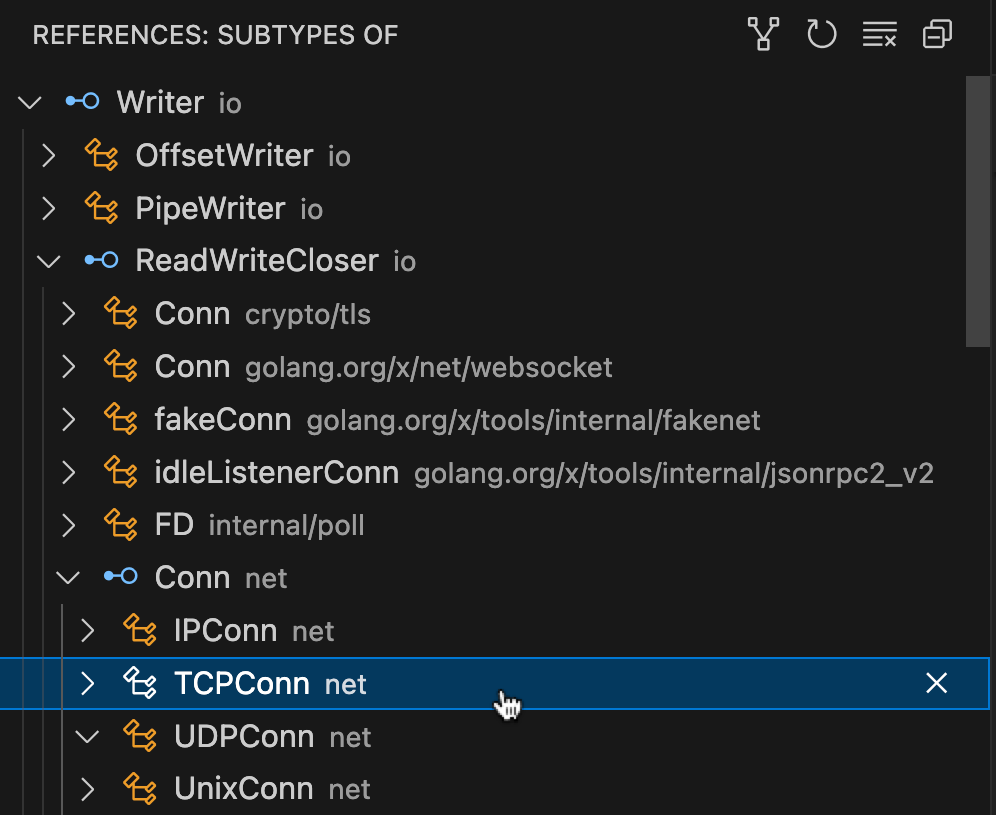
The LSP TypeHierarchy mechanism consists of three queries that together enable clients to present a hierarchical view of a portion of the subtyping relation over named types.
textDocument/prepareTypeHierarchyreturns an item describing the named type at the current position;typeHierarchyItem/subtypesreturns the set of subtypes of the selected (interface) type; andtypeHierarchy/supertypesreturns the set of supertypes (interface types) of the selected type.
Invoke the command while selecting the name of a type.
As with an Implementation query, a type hierarchy query reports function-local types only within the same package as the query type. Also the result does not include alias types, only defined types.
Caveats:
- The type hierarchy supports only named types and their assignability
relation. By contrast, the Implementations request also reports the
relation between unnamed
functypes and function declarations, function literals, and dynamic calls of values of those types.
Client support:
- VS Code:
Show Type Hierarchymenu item opens Type hierarchy view (note: docs refer to Java but the idea is the same for Go). - Emacs + eglot: Support added in March 2025. Use
M-x eglot-show-call-hierarchy. - CLI: not yet supported.
The source files for this documentation can be found beneath golang.org/x/tools/gopls/doc.